Ensuring PCI-DSS, POPI, GDPR, and HIPAA Compliance in Kubernetes Systems
Architecting Kubernetes for Regulatory Compliance
Introduction
Welcome to Part IV of my Kubernetes series, where we delve into building compliant systems on Kubernetes to meet stringent regulatory standards such as PCI-DSS, POPI, GDPR, and HIPAA. As businesses continue to adopt containerized environments, regulatory compliance is more critical than ever. Misconfigurations, poor security practices, and inadequate data protection can expose organizations to severe legal and financial consequences.
Kubernetes has transformed how we deploy, manage, and scale applications, but as industries increasingly adopt containerized systems, ensuring compliance with stringent regulations. In this we'll explore key compliance considerations — storage, network policies, encryption, and access controls and show how Kubernetes-native tools like Open Policy Agent (OPA) and Kubernetes RBAC can streamline the process.
Key Compliance Considerations
1. Storage Compliance
PCI-DSS, POPI, GDPR, HIPAA Requirements: Regulations demand secure storage of sensitive data, including encryption at rest and access restrictions.
Kubernetes Implementation:
Use encrypted Persistent Volumes (PVs) in Kubernetes to secure data storage. Leverage storage classes that provide encryption by default, such as AWS EBS with encryption enabled.
Ensure proper backup policies with Kubernetes-native tools like Velero to create immutable, encrypted backups.
2. Network Policies
PCI-DSS, POPI, GDPR, HIPAA Requirements: Control over traffic flow, especially when dealing with sensitive data, is critical to preventing unauthorized access.
Kubernetes Implementation:
Leverage Kubernetes Network Policies to segment and control traffic between pods, ensuring that only authorized services can communicate.
Use tools like Calico or Cilium to enforce fine-grained network policies, providing an additional layer of security and ensuring compliance.
3. Encryption in Transit and at Rest
PCI-DSS, POPI, GDPR, HIPAA Requirements: Sensitive data must be encrypted during transmission and when stored.
Kubernetes Implementation:
TLS encryption: Use mutual TLS (mTLS) within Kubernetes clusters to encrypt communication between services. Tools like Istio or Linkerd can automatically inject mTLS for pod-to-pod communication.
Ensure Secrets management using tools like HashiCorp Vault or Kubernetes Secrets encrypted with a custom encryption provider.
4. Access Controls and Auditing
PCI-DSS, POPI, GDPR, HIPAA Requirements: Ensure strict access control for both users and services accessing sensitive data, with a robust auditing mechanism to track access.
Kubernetes Implementation:
Implement Role-Based Access Control (RBAC) to define granular permissions for users, pods, and services.
Use OPA Gatekeeper to enforce custom security policies, ensuring that no deployments violate compliance rules.
Integrate audit logging tools like Falco or Kubernetes' built-in auditing to continuously monitor and log access attempts.
Complying with HIPAA in Healthcare app
Consider a healthcare organization building a Kubernetes-based application that stores and processes patient records, which must adhere to HIPAA’s strict security standards.
Problem Statement: The organization needs to ensure that patient data is securely stored and transmitted, access to sensitive data is tightly controlled, and every access attempt is logged and audited.
Solution Architecture:
Encrypted Persistent Volumes: The organization deploys patient records on encrypted Kubernetes Persistent Volumes (PVs) managed by AWS EBS with encryption enabled by default.
Kubernetes Network Policies: Network segmentation is enforced through Network Policies, ensuring that only authorized services such as the patient management API can communicate with the database.
TLS and mTLS: All communication between services is encrypted using Istio for automatic mTLS injection between pods, ensuring that data in transit is secure.
Access Control with Kubernetes RBAC and OPA: RBAC is configured to grant database access only to specific services and users. OPA is used to enforce HIPAA-specific policies, such as preventing services from accessing data unless the request is logged and verified for authorization.
Auditing and Monitoring: Falco is integrated for continuous monitoring, capturing logs of every access attempt to patient records, with real-time alerting on suspicious activity.
System Architecture
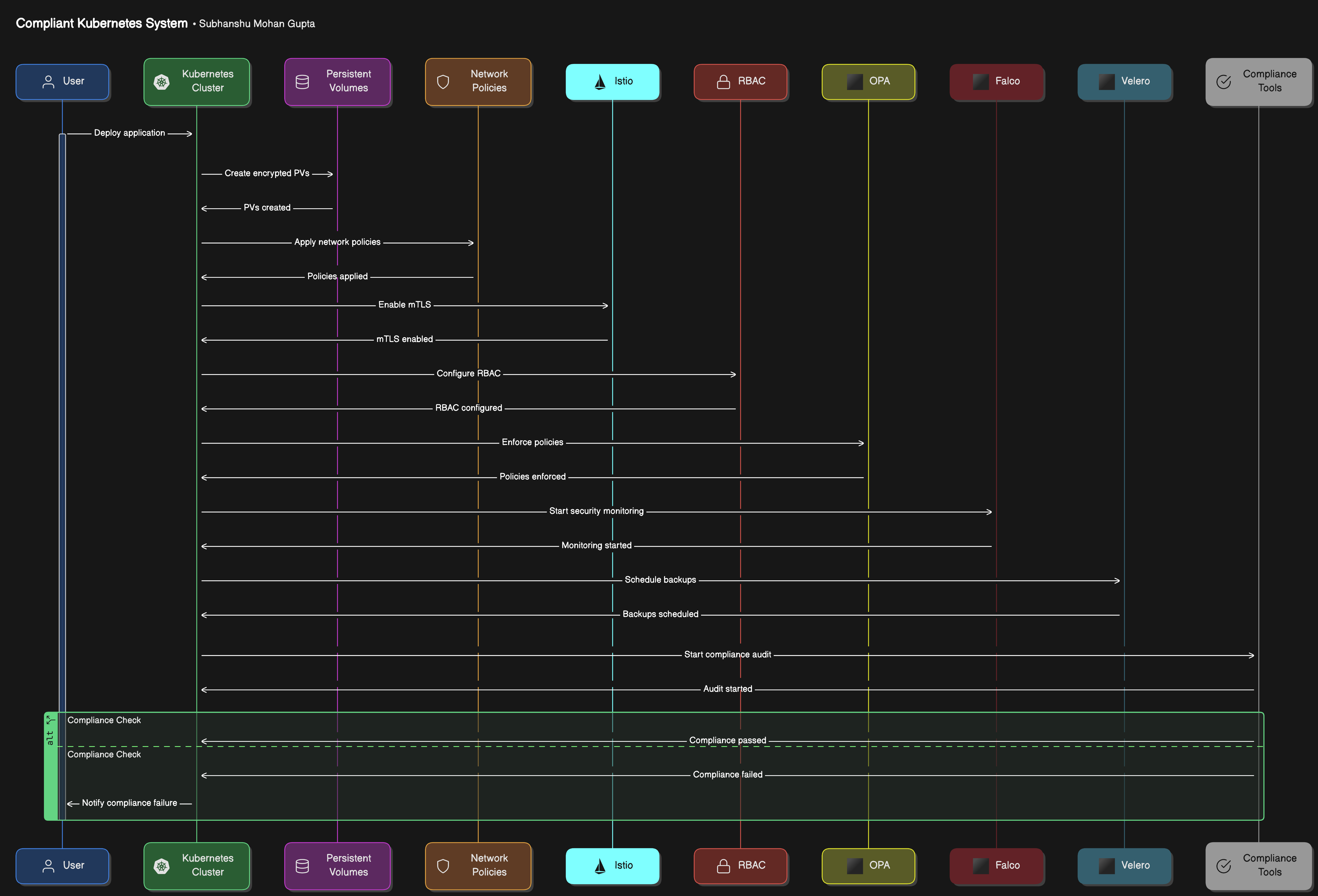
The diagram showcases the lifecycle of an application deployed on a compliant Kubernetes system. Starting with the deployment, it ensures encryption of data at rest and in transit, granular access control, real-time security monitoring, policy enforcement, and regular backups. The process culminates in a compliance audit, verifying adherence to regulatory standards, with results indicating compliance status.
Implementation
Implementing a compliant system on Kubernetes for regulations such as PCI-DSS, POPI, GDPR, and HIPAA requires a step-by-step approach to ensure that encryption, access control, network segmentation, and auditing are properly implemented. Below is a precise technical guide to achieving this, covering all necessary aspects such as encrypted storage, network policies, mTLS, RBAC, OPA, and auditing.
Step 1: Setup Kubernetes Cluster
Begin by deploying your Kubernetes cluster using a managed service such as GKE, EKS, or AKS, depending on your cloud provider. Ensure that the cluster is configured with a secure baseline, including the installation of network policies, encryption, and security monitoring tools.
Step 2: Storage Encryption
To comply with data-at-rest encryption standards (PCI-DSS, GDPR, etc.), ensure your persistent volumes (PVs) are encrypted.
Create an Encrypted Persistent Volume in AWS (EBS): Create a PersistentVolume that uses encrypted AWS EBS. This example is for AWS, but similar approaches apply to other cloud providers.
apiVersion: v1
kind: PersistentVolume
metadata:
  name: encrypted-pv
spec:
  storageClassName: encrypted-sc
  accessModes:
    - ReadWriteOnce
  capacity:
    storage: 10Gi
  awsElasticBlockStore:
    volumeID: vol-0abcdef1234567890
    fsType: ext4
Encrypted Storage Class (Optional): If your provider supports it, you can create an encrypted storage class:
apiVersion: storage.k8s.io/v1
kind: StorageClass
metadata:
  name: encrypted-sc
provisioner: kubernetes.io/aws-ebs
parameters:
  type: gp2
  encrypted: "true"
Provision PVC Using the Encrypted Storage Class:
apiVersion: v1
kind: PersistentVolumeClaim
metadata:
  name: encrypted-pvc
spec:
  accessModes:
    - ReadWriteOnce
  storageClassName: encrypted-sc
  resources:
    requests:
      storage: 10Gi
Step 3: Network Policy Enforcement
Kubernetes Network Policies enforce isolation and communication rules between pods, ensuring only authorized traffic flows, which is critical for compliance.
Create Network Policies to isolate the database from other services except for authorized ones (e.g., an API or backend service):
apiVersion: networking.k8s.io/v1
kind: NetworkPolicy
metadata:
  name: allow-app-to-db
  namespace: mynamespace
spec:
  podSelector:
    matchLabels:
      app: database
  policyTypes:
    - Ingress
  ingress:
  - from:
      - podSelector:
          matchLabels:
            app: myapp
Apply Network Policies: Apply these policies using
kubectl:kubectl apply -f network-policy.yaml
Step 4: Encryption in Transit (mTLS)
To encrypt data in transit, you can use Istio to automatically inject mutual TLS (mTLS) between pods for service-to-service communication.
Install Istio: Follow the official Istio installation guide here.
Enable mTLS Globally: Once Istio is installed, enable mTLS by applying the following policy:
apiVersion: security.istio.io/v1beta1
kind: PeerAuthentication
metadata:
  name: default
  namespace: istio-system
spec:
  mtls:
    mode: STRICT
Deploy Services with Istio: Ensure your services are deployed with Istio sidecar injection enabled. Here’s an example of a simple service:
apiVersion: apps/v1
kind: Deployment
metadata:
  name: myapp
  namespace: mynamespace
  labels:
    app: myapp
spec:
  replicas: 3
  selector:
    matchLabels:
      app: myapp
  template:
    metadata:
      annotations:
        sidecar.istio.io/inject: "true"
      labels:
        app: myapp
    spec:
      containers:
      - name: myapp
        image: myapp-image:v1
Apply the deployment:
kubectl apply -f myapp-deployment.yaml
Step 5: Access Control with RBAC
Using Role-Based Access Control (RBAC) in Kubernetes is critical to ensure only authorized users and services can access sensitive components.
Create an RBAC Role: Define roles with specific permissions.
apiVersion: rbac.authorization.k8s.io/v1
kind: Role
metadata:
  namespace: mynamespace
  name: db-access-role
rules:
- apiGroups: [""]
  resources: ["pods"]
  verbs: ["get", "list", "watch"]
Create a RoleBinding: Assign the role to a user or service account.
apiVersion: rbac.authorization.k8s.io/v1
kind: RoleBinding
metadata:
  name: db-access-binding
  namespace: mynamespace
subjects:
- kind: User
  name: alice # The user to bind
  apiGroup: rbac.authorization.k8s.io
roleRef:
  kind: Role
  name: db-access-role
  apiGroup: rbac.authorization.k8s.io
Apply RBAC resources:
kubectl apply -f rbac-role.yaml
kubectl apply -f rbac-rolebinding.yaml
Step 6: Enforcing Policies with OPA (Open Policy Agent)
OPA ensures policies (e.g., access controls, compliance constraints) are enforced across the cluster.
Install OPA Gatekeeper: Follow the installation guide here.
Create OPA ConstraintTemplate: For example, enforce that no container runs as root:
apiVersion: templates.gatekeeper.sh/v1beta1
kind: ConstraintTemplate
metadata:
  name: k8srequiredlabels
spec:
  crd:
    spec:
      names:
        kind: K8sRequiredLabels
  targets:
    - target: admission.k8s.gatekeeper.sh
      rego: |
        package k8srequiredlabels
        violation[{"msg": msg}] {
          not input.review.object.spec.securityContext.runAsNonRoot
          msg := "Containers must not run as root."
        }
Enforce the OPA Policy: Define a constraint that applies the policy:
apiVersion: constraints.gatekeeper.sh/v1beta1
kind: K8sRequiredLabels
metadata:
  name: require-non-root-containers
spec:
  match:
    kinds:
      - apiGroups: [""]
        kinds: ["Pod"]
Apply the constraint and template:
kubectl apply -f opa-template.yaml
kubectl apply -f opa-constraint.yaml
Step 7: Auditing with Falco
Use Falco to monitor and audit Kubernetes clusters for security and compliance breaches.
Install Falco: Follow the installation instructions at Falco’s official site.
Configure Rules for Auditing: You can customize rules to monitor sensitive actions. For example, to monitor exec commands in pods:
- rule: "Monitor exec command"
  desc: "Detect exec commands in Kubernetes pods"
  condition: container.id != host and evt.type = execve
  output: "Command executed in pod (user=%user.name command=%evt.args)"
  priority: WARNING
  tags: [compliance]
Test Falco Alerts: Test Falco by running an
execin a pod and verifying that Falco logs the event.kubectl exec -it <pod_name> -- /bin/bashFalco should log and alert this action, aiding in auditing access to sensitive systems.
Step 8: Backup & Recovery with Velero
Velero provides disaster recovery and backups, essential for compliance.
Install Velero: Follow the Velero installation guide.
Configure Backups: Create a backup for your namespace:
velero backup create my-backup --include-namespaces mynamespace --snapshot-volumesVerify Backups: List and restore backups:
velero backup get
velero restore create --from-backup my-backup
Testing
Test Compliance Policies: Use
kubectlto deploy resources that violate policies (e.g., running containers as root) and verify that OPA or RBAC blocks the deployment.Test Auditing: Perform actions such as accessing sensitive data or executing privileged commands in pods and check if Falco logs these events.
Conclusion
Building compliant systems on Kubernetes requires thoughtful architecture, utilizing Kubernetes-native tools like OPA and RBAC, combined with encryption, network segmentation, and auditing. As demonstrated in the real-world example, implementing a HIPAA-compliant healthcare application becomes feasible when following these best practices. By leveraging Kubernetes’ inherent security features, organizations can ensure they meet PCI-DSS, POPI, GDPR, and HIPAA requirements without sacrificing agility or scalability.
With these strategies, your Kubernetes infrastructure will be well-positioned to handle stringent regulatory environments while remaining flexible enough for future growth and innovation.
References
Open Policy Agent (OPA): OPA Documentation
Learn how to use OPA for policy enforcement in Kubernetes.Istio mTLS (Mutual TLS): Istio mTLS Documentation
Guide to configuring mTLS in a Kubernetes cluster using Istio service mesh.Kubernetes RBAC (Role-Based Access Control): Kubernetes RBAC Documentation
Understand how to set up RBAC for managing access control in your Kubernetes cluster.Falco for Kubernetes Security Monitoring: Falco Documentation
Learn how to implement runtime security monitoring in Kubernetes with Falco.Velero for Backup and Disaster Recovery: Velero Documentation
Guide on how to use Velero for managing backups and disaster recovery in Kubernetes.Kubernetes Persistent Volumes and Encryption: Persistent Volumes Guide
Detailed explanation on setting up persistent volumes and ensuring data encryption.Network Policies in Kubernetes: Kubernetes Network Policies
Learn how to enforce network security and isolation in Kubernetes with network policies.Compliance Frameworks:
PCI DSS: PCI-DSS Compliance Guide
GDPR: GDPR Official Guide
HIPAA: HIPAA Compliance Overview
POPI Act: POPI Act Summary
What’s next?
Stay tuned for Part V of my Kubernetes series, where we’ll explore Calculating the Composite SLA for Distributed Kubernetes Systems, diving deeper into managing uptime and performance across complex, distributed architectures.


